Browsing Core Data databases using F-Script
F-Script, the Cocoa-based scripting environment, now provides some great tools for exploring Core Data databases.
I couldn’t figure out how to easily open up my databases, other than manually creating a managed object model, then a persistent store coordinator, then a managed object context on the console. I couldn’t find any existing tools, and I wanted a quick workflow for opening up my databases, so I put together a script that prompts for the application bundle or .xcdatamodel(d) data model file, then prompts for the XML (.xml), binary (.binary) or SQLite (.sql or anything else) database file, and opens up the inspector.
I wrote it as an Applescript that just calls upon F-Script to evaluate the script, and saved it in an application bundle so I can pull it up quickly.
Here it is:
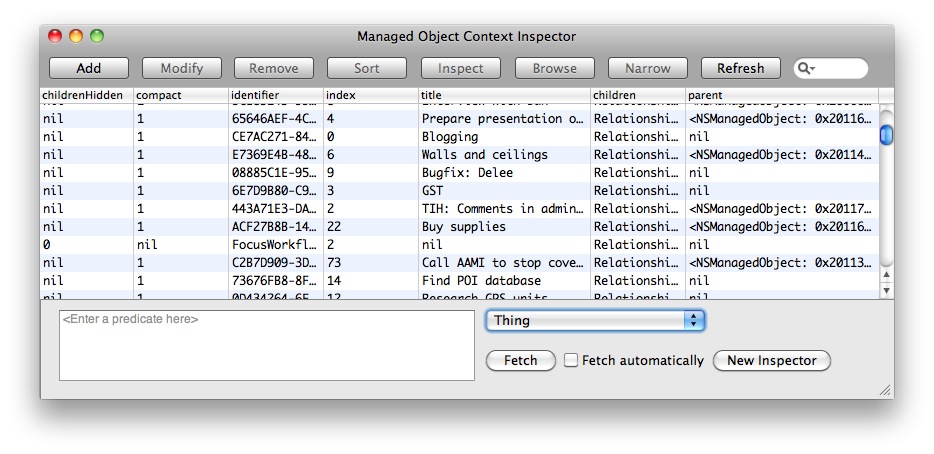
It just needs the F-Script app to be available.
Upon opening, the managed object context is available on the console as “context“. So, aside from using F-Script’s object browser, you can also do things like:
> request := (NSFetchRequest alloc) init > request setEntity:(NSEntityDescription entityForName:'MyEntity' inManagedObjectContext:context) > request setPredicate:(NSPredicate predicateWithFormat:'type = 3') > result := context executeFetchRequest:request error:nil > result _PFArray { (entity: MyEntity; id: 0x20064c9e0 ; data: ), (entity: MyEntity; id: 0x20064c9c0 ; data: ), (entity: MyEntity; id: 0x200651180 ; data: ) ... |
Update: Now has better error reporting, and the option to load classes from a bundle.
For those interested, here’s the original F-Script:
Read More