Personalising AddThis’s Tweet Button
AddThis is a quite useful WordPress plugin for adding a host of sharing options to your blog posts.
By default, the “Tweet” button that AddThis provides will append “via @AddThis” to the end of tweets, which seems to me a little uncool, given that it’s your content.
So, here’s a little plugin that lets you specify your own Twitter account name instead of @AddThis.
The principle is simple: AddThis were kind enough to define their own filter for the plugin’s output. The plugin plugs itself into this filter, and makes an adjustment to the Tweet button.
To use it, put addthis-modifier.php into your wp-content/plugins folder, open it up and set your twitter name where indicated. Activate it, and you should be good to go.
Download the plugin: AddThis Modifier Plugin
For extra marks: Here’s some code you can use to replace line 14 (the $twittername = … line) to provide a different Twitter account for each post author. Is that not awesome?:
$accounts = array('Michael' => 'MichaelTyson', 'Katherine' => 'NellieWindmill'); $twittername = $accounts[get_the_author()]; |
Links for May 30th through August 8th
Links for May 30th through August 8th:
- cufón – fonts for the people A very impressive framework that embeds any font into a website, via javascript and the canvas element. Great cross-browser support.
- mikeash.com: Method Replacement for Fun and Profit Method replacement and method swizzling in Objective-C.
- Core Data Tutorial: How To Use NSFetchedResultsController | Ray Wenderlich
- TwitThis – Use Multiple Twitter Clients on your iPhone Application The class TwitterClientManager loads a list list of supported Twitter clients is loaded from a plist file, which can be extended to support more clients in the future;
Each Twitter client is represented by an instance of the TwitterClient class;
The user can choose his preferred Twitter client at any time, and launch the application by a simple touch; the TwitterClientManager class stores the selected value in the user settings.
Twitter Image Host for WordPress
See the new version, Twitter Image Host 2, which stores images as actual WordPress posts, for more easy customisation and management. It can be run at the same time as Twitter Image Host, for easy migration.
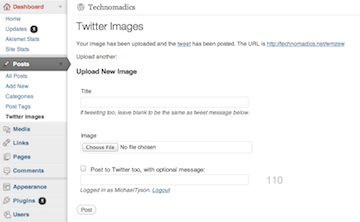 Keep your traffic in the family! Host Twitter images on your own site, with support for comments and trackbacks, image
resizing and thumbnailing with Lightbox.
Twitter doesn’t yet come with its own inline image support, so we tend to be limited to using image hosting services,
and linking to them with short URLs. So, services like Twitpic host the image, and we direct traffic to them in return.
Better to take advantage of that traffic, and host images on your own site. This way, viewers come to your site, instead
of someone else’s!
Posted images are displayed in your normal WordPress template, with support for comments and trackbacks, without any
setup required. Most themes should work with this, but if not, or if a different layout is required, a custom theme template
can also be provided (see ‘Creating a Template’).
Provides an HTML form for posting image content, as well as an API modelled on that of img.ly,
compatible with Tweetie (for iPhone) and any other Twitter clients that speak this protocol and offer configuration of
custom image hosting services.
Uses Twitter’s authentication and a list of authorised accounts, so you can let others use your image host too. You can even
post status updates to Twitter while submitting images.
Provides a widget and shortcode to display uploaded images. This supports filtering by Twitter account, styling with CSS,
and Lightbox/Thickbox.
DIY Twitter image hosting
Twitter doesn’t yet come with its own inline image support, so we tend to be limited to using image hosting services, and linking to them with short URLs. So, services like Tweetpic host the image, and we direct traffic to them in return.
Thinking it’s better to keep things in the family, and take better advantage of that traffic, I put together an image hosting setup of my own. Now viewers come to my own site, instead of someone else’s!
It looks like this
The setup consists of an Automator service, and some PHP smarts on the site.
 Under Snow Leopard, I can right-click on an image in Finder, click ‘Send Image to Image Hosting’, type in a title, then paste the URL that’s automatically been put onto my clipboard into a tweet.
Here’s how it works – this assumes a moderate level of understanding of PHP and assorted web administration.
Read MoreTwitter posting lists with images

Recently I released some code to discover and embed Twinkle images linked from Twitter postings, and released a modification to Ricardo González’s Twitter for WordPress plugin which uses it.
I’ve now implemented support for Twitpic as well.
Grab the modified WordPress plugin here:
twitter-for-wordpress-plus-images-v0.2.6.zip
After installation, add the widget and make sure ‘Discover images’ is ticked.
For non-Wordpress users, the base code is also available here:
TwitterImageUtil.class.php-v0.2.6.zip
Include it in your twitter list source code, and use it as a filter for the message content. Something like:
$message = TwitterImageUtil::processContent($message, $mysql_database_handle);
Some configuration is possible – see the header comments for more details.
The code will create a thumbnail of the image, and store it locally. It’ll also cache the results in a MySQL database for speed. It supports Lightbox, too – just supply the relevant flag to turn it on.
Updates
- Version 0.2.6: Bugfix for posts with both images and @mentions
- Version 0.2.5: Bugfix from prior version, plus compatibility fix for Twitpic changes
- Version 0.2.4: Updated to match Twitter for WordPress v1.9.2: Compatibility fix for WP 2.7
- Version 0.2.3: Another update, chasing the moving target that is Twitpic
- Version 0.2.2: Updated to match Twitpic’s new image storage using Amazon S3.
Keeping iChat and Adium status in sync with Twitter
I’ve been using Twitter for a while now, and I’ve just started doing ‘global’ status updates across Twitter, Facebook, and my instant messenger account statuses for iChat and Adium. Usually I use MoodBlast, a really nice application which lets me use a global keyboard shortcut to quickly enter a tweet and hit enter to update everything simultaneously.
However, if I want to update from, say, Twinkle on my iPhone (side-note: Wow, Tapulous need to do some serious SEO – their Twitter site isn’t even on the first page of Google hits. I’m on the first page of Google hits for it, ferchrissake) the sync won’t happen. This Ruby script will do the trick.
Read More