I’m working on two projects right now that have static library products, to be given to other developers to use in their projects: Audiobus and The Amazing Audio Engine. In both cases, I’m making quite heavy use of my circular buffer code, TPCircularBuffer, which would result in duplicate symbol errors if the static library were linked with another project that used it.
In case the solution was useful to others, here’s how I worked around it: Use the preprocessor to rename the symbols automatically during the build phase.
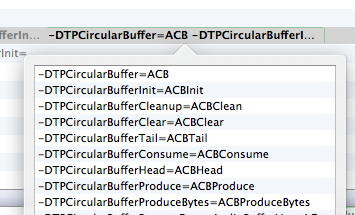
This is done by adding a series of -DOldSymbol=NewSymbol flags to the ‘Other C Flags’ build setting – like -DTPCircularBuffer=ABCircularBuffer, for instance.
No more symbol conflicts.


Compiling Image Resources into a Static Library
I’ve recently been working on a static library for distribution to other developers — Audiobus — and I need to include a couple of graphical resources with the distribution. The usual solution to this is to include the resources separately in a bundle, and require the user to drop them in to their project along with the static library.
I thought I’d see if I could make the process just a little neater, and successfully devised a way to compile the images straight into the library, so the distribution remains nice and clean — just the library itself and a few header files.
Now, I can pop image resources into a folder, and after compiling, access them within the static library with:
It automatically handles “@2x” Retina images (although it doesn’t currently do “~ipad” versions).
Here’s how it’s done.
The magic is in a shell script which uses the
xxdhex dump tool to create C code that represents the image data as a byte array, then creates around it a set of utilities to turn those arrays into UIImages on demand.Along with it is a couple of template files — a header and implementation file — that describe the format of the derived code.
Finally, a little tweaking of the project in Xcode (with a brief foray into a text editor to work around some Xcode shortcomings) puts it all together. Read More »